What do I upload?
One clear portrait of one adult, used with permission. Children, pets, couples and groups are not supported.
 AI Halloween.Sign in ↗
Apply a Moonlight AI Halloween filter to a single adult portrait. Explore real examples and preview color changes in your browser.
A clear, well-lit photo works best. Creative edits may change facial details.
Single adult portraits only. Children, pets, couples and groups are not supported.
Cool blue moonlight and soft silver highlights.
Sign in to load your saved images and trial eligibility.
The free trial is shared across Photo, Costume and Filter, subject to eligibility and verification. If already used, an image costs 1 paid credit. View pricing.
This is an image-only effect. Witch and Moonlight results cannot use Pumpkin Animate.
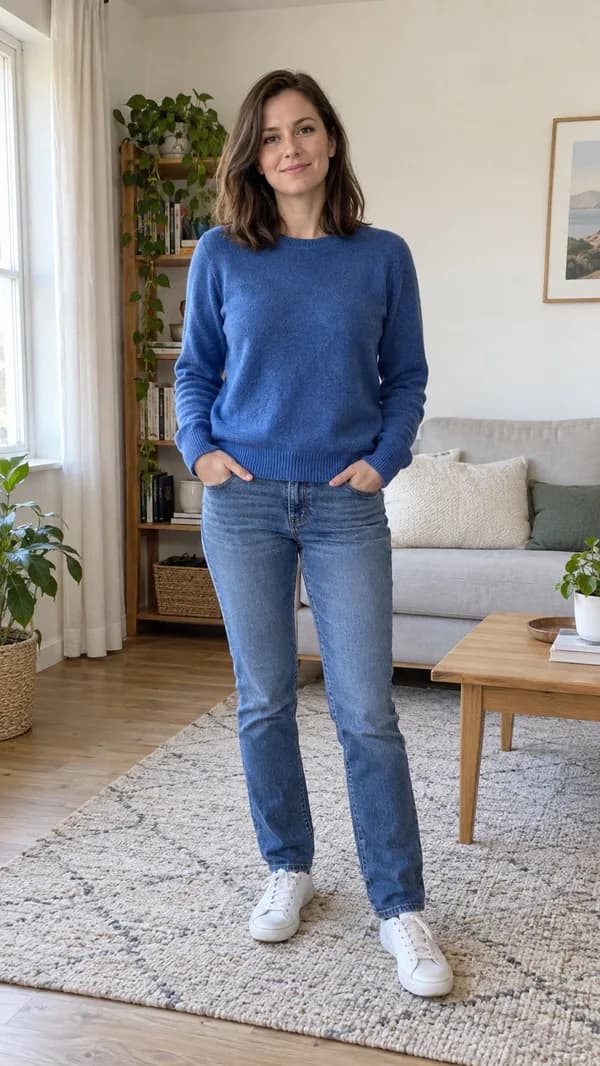
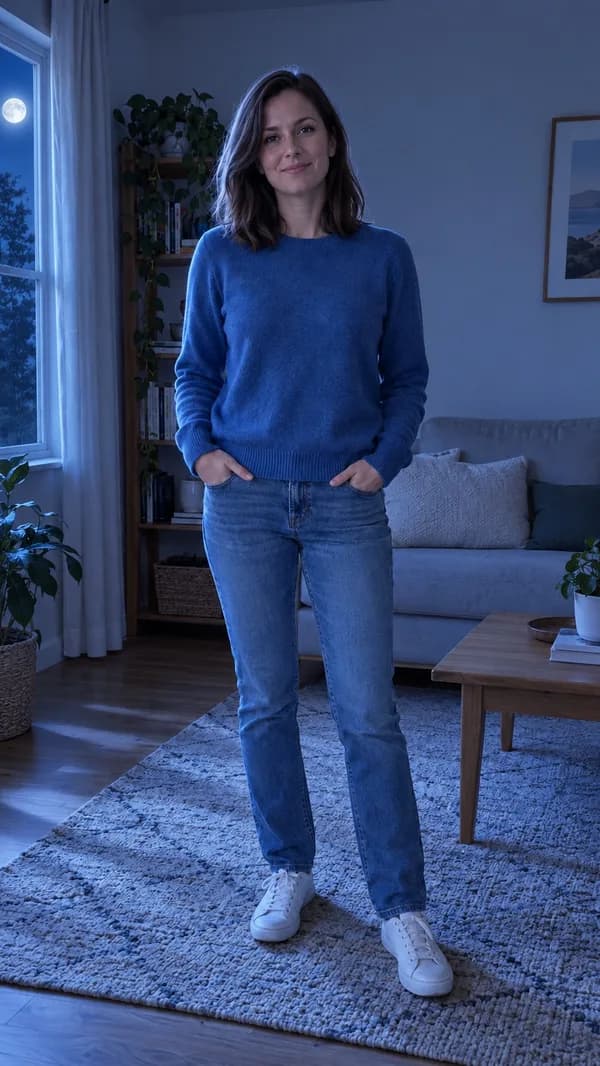
Fictional demonstration subject. Your private result will appear here.
AI Halloween Filter offers a browser-only color preview and a separate AI image edit. The preview changes the color of one original photo without using credits. The currently available AI edit applies Moonlight to one adult portrait.
One clear portrait of one adult, used with permission. Children, pets, couples and groups are not supported.
A private downloadable AI image. Download within 7 days and review faces and details before sharing. A local Filter preview is not an AI-generated result.
When generation is available, each signed-in account can receive one successful free image shared across Photo, Costume and Filter. Additional images cost 1 paid credit each. Verification and availability limits apply.
See current credit packagesFROM THE SAME PHOTO
Actual model outputs from our tests. The source people and pets are fictional, AI-created demonstration subjects. These historical samples may show effects or models that are no longer offered. Your results will vary.
PICK YOUR MOOD
Distinct looks for different stories.
Choose a card to explore its tool.
Cards describe creative directions. The example gallery shows actual generated samples. Only the effects shown above are currently offered.
FROM CAMERA ROLL TO ANOTHER WORLD
Upload one adult portrait that you have permission to use.
Use the available single-adult effect. Children, pet, couple and group modes are not offered. Review the credit cost before generating.
The result appears in your private workspace. Download a finished image or short MP4 with generated sound; only a completed single-adult Pumpkin portrait can become a video. Witch and Moonlight are image-only effects.
CLEAR EXPECTATIONS
The local preview changes color in your browser and does not use a generation credit. Generate AI Filter sends the photo for an actual image edit. The edit aims to preserve the face, clothing and framing while adding the selected lighting, makeup or background treatment. Compare the original and result before downloading.
Keep the important subjects fully inside the photo. Avoid heavy filters, covered faces, extreme camera angles and dim lighting. Use one adult portrait; two-photo composition is not offered. Creative generation may change details, so identity accuracy is never guaranteed.
KNOW WHAT YOU USE
Local filter previews use no credits. When generation is available, one successful AI image trial per signed-in account is shared across Photo, Costume and Filter. Further images use 1 paid credit each. 5-second Animate videos use 5 paid credits; there is no free video generation. Purchases are one-time with no automatic renewal. See the confirmed packages on the pricing page. Sign in to purchase credits securely.
Video output targets a short 720p MP4 with generated sound. Actual dimensions and duration are checked before delivery. We do not claim verified export timing or watermark-free output before real tests. A technical generation failure releases reserved user credits; an uncertain provider response is reconciled without submitting another paid task.
Credits & pricingBEFORE YOU STEP INSIDE
There is no guaranteed delivery time. Processing depends on the selected effect, provider queue and safety checks. A submitted task can be recovered in the same account. Check availability before purchasing; download completed results within 7 days.
Only use photos and other material you own or have permission to use. Generated output does not clear third-party copyright, trademark or likeness rights. Review the terms, acceptable-use policy and the rules of the platform where you plan to publish.
No. Only single-adult portraits are currently offered. Two-person and person-and-pet modes have been removed.
No. Child, pet and group inputs are not currently supported. Use a single adult portrait with permission.
No exact identity guarantee is made. Clear front-facing photos help, but AI can change faces, hands and small details. Review the result before sharing it.
A submitted task is saved on the server. Sign in to the same account to recover it. Photos selected but not yet submitted are only in the current browser tab. A refresh does not create another paid task.
No. Uploads and results are stored privately and owner access is checked. Input access expires after 24 hours and result access after 7 days; daily cleanup removes expired files. Providers have their own retention policies.
Only a completed, unexpired single-adult Pumpkin portrait in your account can be animated into a five-second video, for five paid credits.
Confirmed technical generation failures release reserved credits. Purchase refunds are reviewed separately under the refund policy. Refunded purchase credits cannot be reused.